If you want to test Copilot Cowork in a tenant today, it is not enough to only assign a Microsoft 365 Copilot license and tell users to open Copilot and locate the Cowork agent. At the time of writing we need to both enable the Frontier Program and also opt-in to use Anthropic as a sub-processor before it becomes available to the end users.
This is well documented at Microsoft, but these are only described in parts here and there, so the idea of this post is to have a simple step by step guide to accomplish this instead of trial and error as I had to go through.
Solution
Before you start, make sure the pilot users already have a Microsoft 365 Copilot license assigned as this is the foundation for using Cowork.
Step 1: Join the Frontier program
This step requires you to have the role AI Administrator, Security Administrator or Office Apps Administrator.
Go to the Microsoft 365 admin center at admin.microsoft.com, then do the following:
- Open Copilot in the left navigation.
- Select Settings.
- Open the View all tab.
- Open Copilot Frontier.
- Choose one of these options:
- All users
- Specific users
- Save the setting.
For a pilot I recommend using Specific users. This only supports adding users one by one for now, unfortunately.

After enabling Frontier, Microsoft notes that it can take up to three hours before Frontier features and agents become available to users.
Step 2: Enable Anthropic for the tenant
To get Copilot Cowork you need to allow Anthropic under AI providers operating as Microsoft subprocessors.
This step requires you to have the role Global administrator.
In the Microsoft 365 admin center:
- Go to Copilot > Settings > View all.
- Open AI providers operating as Microsoft subprocessors.
- Under Available subprocessors for your organization, select Anthropic.
- Under Choose who can access Anthropic models for Copilot and generative AI experiences, choose one of these options:
- All users
- Specific users and groups
- Save again.
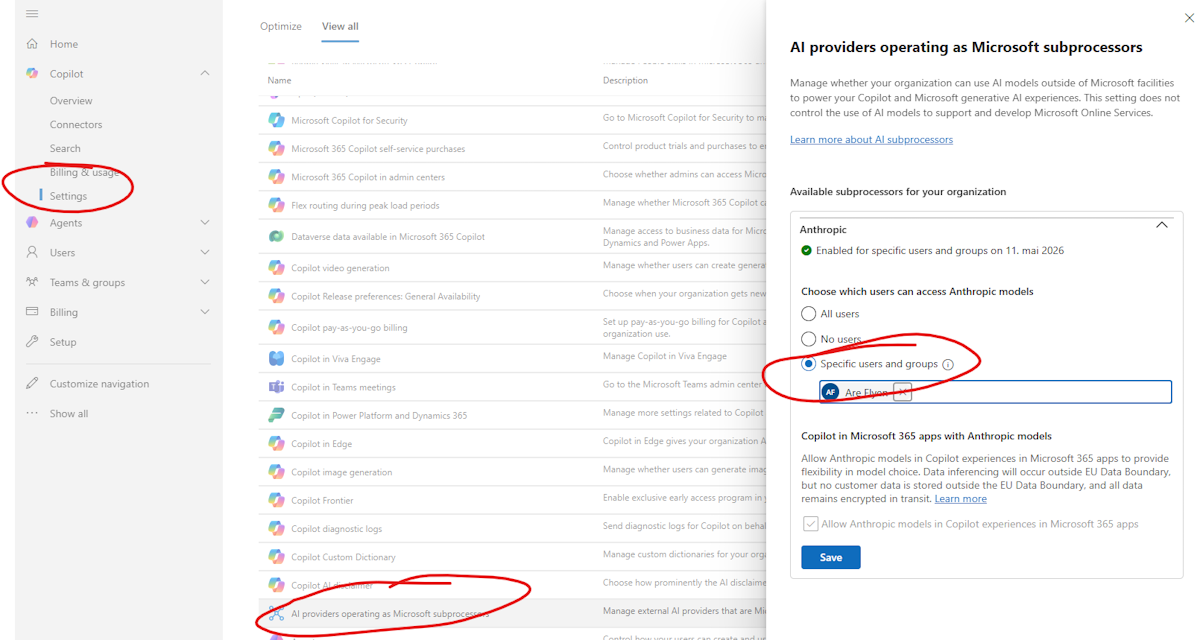
According to Microsoft, this setting is Off for tenants in the EU, EFTA, or the UK regions. In other regions Anthropic can already be enabled by default, or even unavailable at this time.
Step 3: Make Cowork available and add it as an end user
If the two steps above were recently changed, it will take a while before the settings take effect. I would allow up to 24 hours before expecting it to become available.
- Go to the Microsoft 365 Copilot Chat: m365.cloud.microsoft/chat
- Select All agents, search for Cowork, and select it.
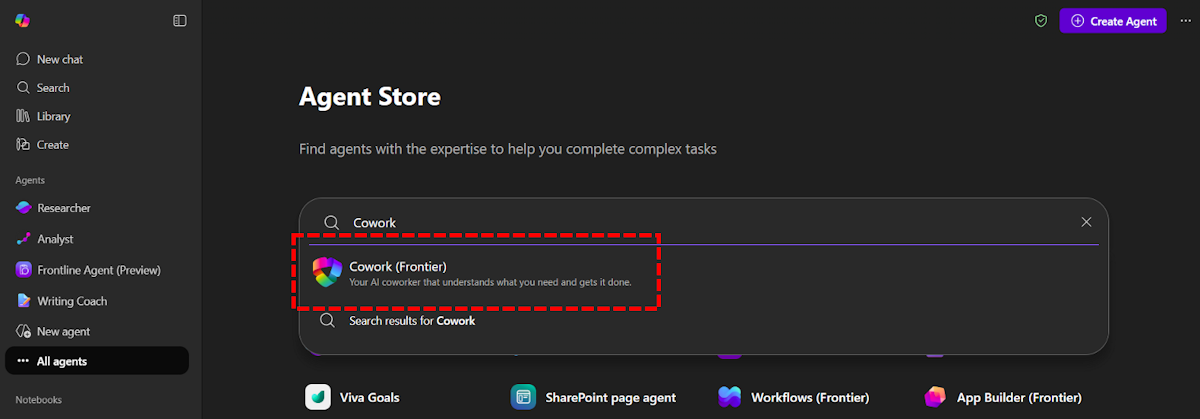
- Choose Add and it will be available from the menu under the Agents group.

Microsoft agents are generally available by default, but if your organization has restricted agents, you might need to enable them under Agents > Settings in the Microsoft 365 admin center.
Summary
To get Copilot Cowork working in a tenant, I would verify the setup in this order:
- Enable Copilot Frontier for a pilot group.
- Enable Anthropic under AI providers operating as Microsoft subprocessors for selected users.
- Verify that Cowork is available.
That sequence made the setup much easier to understand. The most confusing part for me was step 2, because older references to Anthropic’s separate agreement no longer match the current Microsoft 365 admin center flow.